


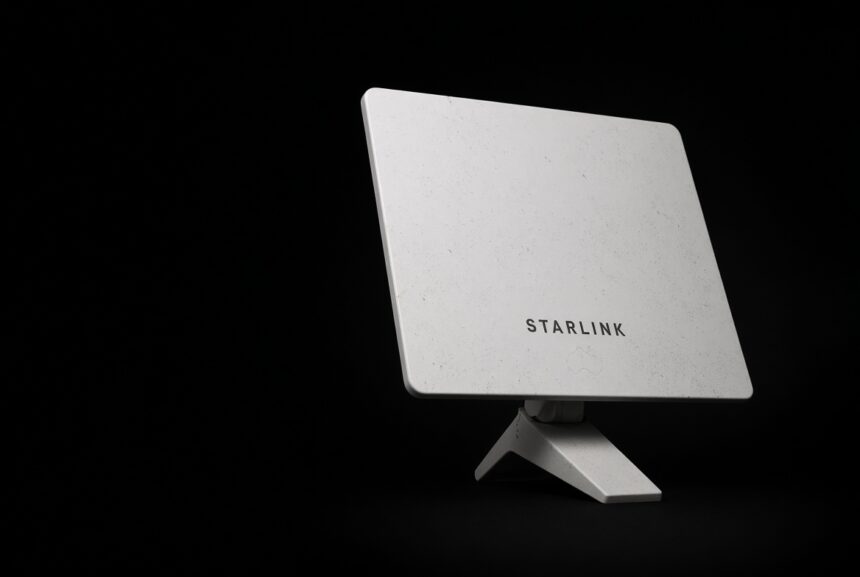
The best internet regional Australia readers can get still depends on the property. A house in town can sit on fibre. The next one out might be on a Fixed Wireless tower. Further on you’re looking at Sky Muster, or a weak 5G cell, or a Starlink dish on the shed. Compare plans after you know which of those you already have.
- How to find the best internet regional Australia at your address
- Options behind the best internet regional Australia choice
- Best internet regional Australia compared
- How to pick the best internet for regional Australia
- Other things that matter
- What a year of the best internet regional Australia costs
- If you work from the property
- Mistakes worth skipping
- FAQ: best internet regional Australia
- Bottom line
How to find the best internet regional Australia at your address
These lookups take about ten minutes.
Put the address into the NBN Co checker. Write down the technology: FTTP, FTTC, FTTN, HFC, Fixed Wireless or Satellite.
Then check Telstra, Optus and Vodafone/TPG for 5G home internet. The town can show coverage while your road still has no plan for sale. Telstra still covers more of the bush than the others.
Then check Starlink Australia. If the dish can see the sky, you can usually order it. Some busy cells add a one-off surcharge, and that only shows up when you enter the exact address.
Options behind the best internet regional Australia choice
NBN fibre and cable (FTTP, HFC, FTTC)
FTTP is the one to keep. It is fast, and rain does not touch it. HFC is close enough for most homes. FTTC is usually fine.
NBN FTTN
Fibre runs to a street cabinet. Old copper finishes the run into the house. Close to the node, it can be decent. A long copper run is why a “100 Mbps” plan sometimes crawls in the evening.
NBN Fixed Wireless
A roof antenna pointed at an NBN tower. The regional upgrades helped a lot of properties reach NBN 100. The connection still shares that tower with the neighbours, and heavy rain can knock it around.
NBN Sky Muster
The high satellite. Some Plus Premium plans now advertise higher speeds and unmetered data. Lag is still about 600 milliseconds. Downloads can look fine. Video calls usually do not. Apps that need a quick reply tend to suffer.
NBN Co is lining up a low-Earth-orbit service (nbn LEO, using Amazon Leo) so Sky Muster customers can move across from around mid-2027. You cannot order that this week.
5G home internet
A box on the mobile network. In a strong cell it can leave a bad copper line behind, and you plug it in the same day. Out on a farm it may not be for sale. Sometimes it drops to 4G and crawls after dinner. Providers also limit how many home services they put on one tower.
Starlink
Low satellites, much closer than Sky Muster. In Australia the mid plans often sit around 80–200 Mbps down and 10–30 Mbps up. Lag is commonly 25–60 ms. Zoom works. Cloud backups work. Most games are fine.
Kit is about $549–$599 to buy, or a monthly rental on some offers. Residential plans through 2026 are often quoted around $75 for a 100 Mbps cap, $110 for 200 Mbps, and $150 for the uncapped Max tier. Check the live price before you budget for it.
Trees get in the way. Heavy rain gets in the way. A dish under a line of gums is a poor dish.
Best internet regional Australia compared
Typical 2026 ranges for the best internet regional Australia decision. Your gate will differ.
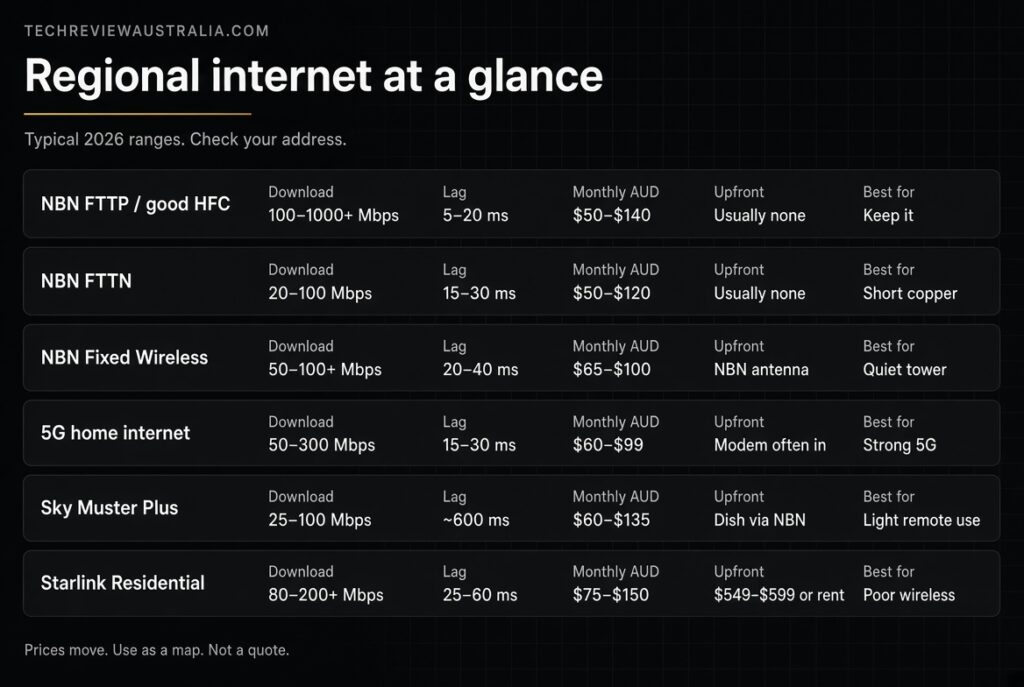
| Option | Download (typical) | Lag | Monthly (AUD) | Upfront | When it makes sense |
|---|---|---|---|---|---|
| NBN FTTP / good HFC | 100–1000+ Mbps | 5–20 ms | $50–$140 | Usually none | You already have it |
| NBN FTTN | 20–100 Mbps | 15–30 ms | $50–$120 | Usually none | Short copper run |
| NBN Fixed Wireless | 50–100+ Mbps | 20–40 ms | $65–$100 | NBN antenna | Tower is upgraded and not packed |
| 5G home internet | 50–300 Mbps | 15–30 ms | $60–$99 | Modem, often included | Strong 5G at the house |
| Sky Muster Plus / Premium | 25–100 Mbps | ~600 ms | $60–$135 | Dish through NBN | Remote, light use, tight budget |
| Starlink Residential | 80–200+ Mbps | 25–60 ms | $75–$150 | ~$549–$599 or rental | Sky Muster or poor wireless |
Prices move. Use the table as a map.
How to pick the best internet for regional Australia
You have FTTP or solid HFC. Stay. Shop around on the same speed tier. Good fibre still wins on cost and consistency.
You have FTTN. Speed-test at 8 pm for a week. If you’re getting what you pay for, leave it. If a 50 or 100 plan is stuck in the 20s, try 5G home internet first. Go to Starlink if 5G is weak, or if nobody will sell it to you.
You have Fixed Wireless. If evenings are fine and calls hold, keep it. If the tower falls over every night, Starlink is the usual next step. 5G is worth a look only if a Telstra sector is close.
You’re on Sky Muster. Most households that switch to Starlink notice the lag drop first. Calls start working. Cloud tools stop stalling. Keep Sky Muster if the hardware cost is the problem and the house only needs email and light streaming. Watch nbn LEO from 2027 if you want to stay with an NBN retailer.
No usable NBN and no 5G. Starlink. Give the dish sky.
Other things that matter
Sky Muster still feels old at 100 Mbps because of the lag. A Teams call needs a short round trip. A movie download does not.
Upload runs out quietly. Photo backups chew it. Large files chew it. Two people on a call will get through Sky Muster’s typical 5 Mbps up pretty quickly.
Evening load hits Fixed Wireless because the tower is shared. Same with 5G. Starlink shares a cell. Fibre keeps going when the street starts Netflix.
Weather hits the wireless options. Trees hit them too. Fibre keeps going.
Most of these plans are month to month. Read the 5G modem return fee before you treat the box as free.
What a year of the best internet regional Australia costs
A household that streams, works from home, and needs calls to hold might see something like this.
NBN 100 at $80 a month is $960, with no kit.
5G home at $85 is $1,020. The modem is usually in the plan.
Starlink 100 Mbps at $75 plus a $549 kit is $1,449 in year one. After that you only pay the monthly rate.
Pay the extra for Starlink when the cheaper service cannot carry the work.
If you work from the property
For payroll or telehealth, look at lag first, then upload. Keep a backup. A Telstra phone hotspot is ugly, and it gets you through a bad night on the dish or the tower.
A satellite plan that drops every call costs more than it looks.
Mistakes worth skipping
Do not stack Starlink against town fibre. Starlink is the answer for Sky Muster and for bad wireless.
Do not order a dish into a tree line. Use the app’s obstruction view before you pay.
Do not assume 5G home internet is for sale because the highway sign has a 5G logo.
Do not ignore an FTTP upgrade if NBN Co has flagged your FTTN place.
FAQ: best internet regional Australia
Is Starlink better than NBN out here?
On good fibre, no. On a packed Fixed Wireless cell, tired copper, or Sky Muster, often yes.
Can I run Starlink and keep NBN?
Yes. Plenty of places use Starlink day to day and keep a cheap NBN or 4G service for weather.
Will 5G home internet work on a farm?
Only if a provider will sell it at that address and the signal holds. Check the house rather than the suburb.
Does nbn LEO replace Starlink?
It will give Sky Muster addresses another low-orbit choice once retailers launch it. Official material points to a move from around mid-2027. You cannot buy it off the shelf in 2026.
Do I need an installer for Starlink?
Most single-storey homes with a clear roof do it themselves. Two-storey sheds are harder. Long cable runs are harder. Tin roofs in the wind are why local techs stay busy.
What speed do we need?
Email and browsing for one or two people: 25–50 Mbps is enough. Family streaming plus homework sits in the 100 Mbps class. CCTV to the cloud, or a small office, needs you to look at upload and lag before you buy a bigger download number.
Bottom line
Read the NBN technology on the checker.
Keep fibre.
Replace bad copper with 5G if the tower is strong.
Keep Fixed Wireless when the evening tests hold.
Leave Sky Muster unless money is the only lever.
Use Starlink when the line and the tower have already lost.
That order still works after the next price change.